Running docker run commands by hand for an app container, a database, and a cache gets unmanageable fast: you end up with a shell script full of --network, -e, and -v flags that nobody wants to touch. Docker Compose replaces that with a single declarative file, and for local development it solves a second problem too: getting your Node.js container to pick up code changes without a full image rebuild on every save.
This article covers a docker-compose.yml for a Node.js API with PostgreSQL and Redis, why bind mounts and node_modules interact the way they do, and the healthcheck pattern that stops your app from crashing on startup because the database wasn't ready yet.
What Compose Actually Gives You
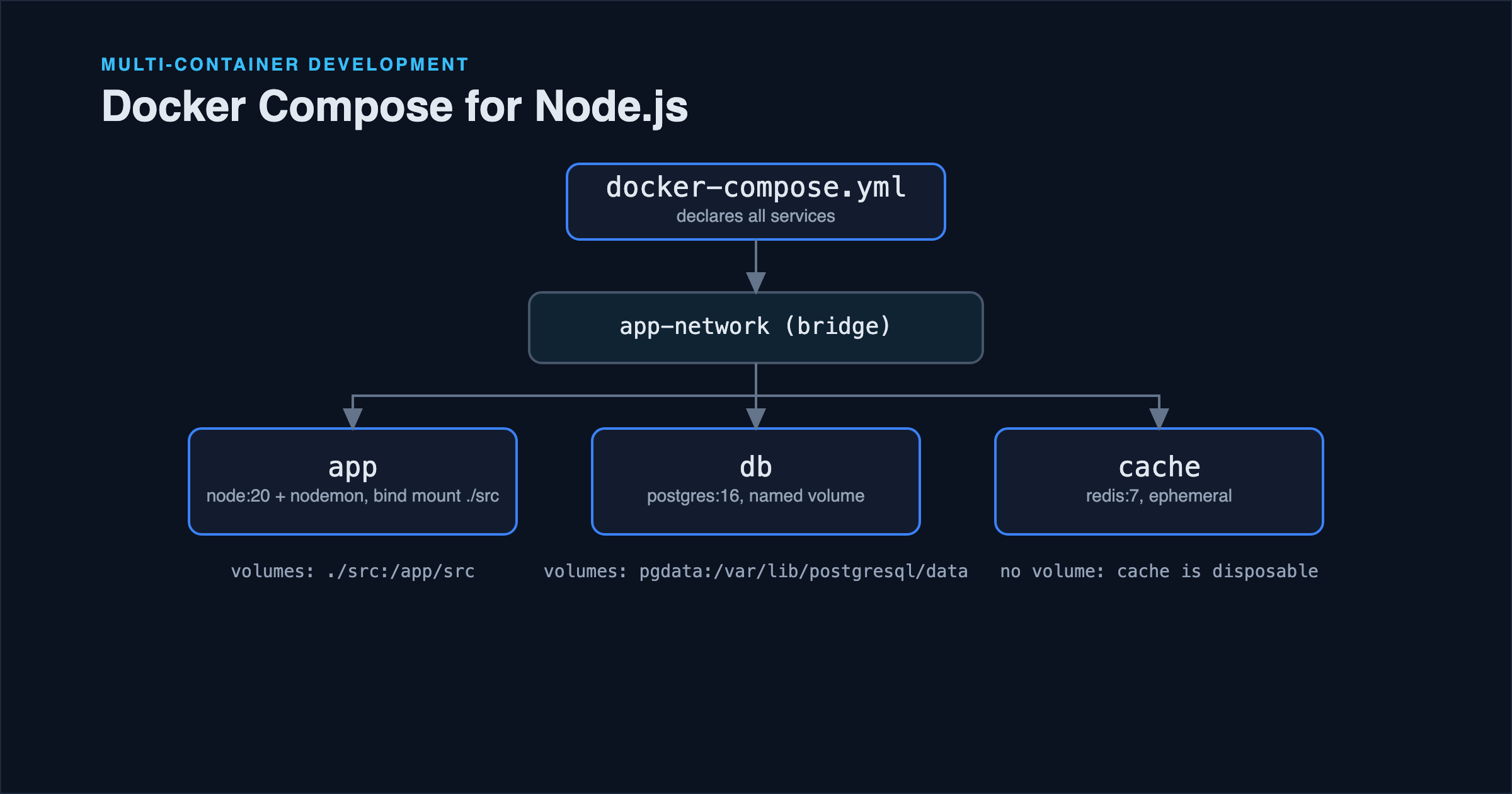
A docker-compose.yml file declares a set of services (each backed by an image or a build context), the network they share, and the volumes they use: then docker compose up creates and starts all of it together, with services able to reach each other by service name over a private network automatically.
Here's a stack for a Node.js API with PostgreSQL and Redis:
services:
  app:
    build:
      context: .
      dockerfile: Dockerfile.dev
    ports:
      - "3000:3000"
    volumes:
      - ./src:/app/src
      - /app/node_modules
    environment:
      NODE_ENV: development
      DATABASE_URL: postgresql://postgres:devpassword@db:5432/app_dev
      REDIS_URL: redis://cache:6379
    depends_on:
      db:
        condition: service_healthy
      cache:
        condition: service_started

  db:
    image: postgres:16-alpine
    environment:
      POSTGRES_PASSWORD: devpassword
      POSTGRES_DB: app_dev
    volumes:
      - pgdata:/var/lib/postgresql/data
    healthcheck:
      test: ["CMD-SHELL", "pg_isready -U postgres"]
      interval: 5s
      timeout: 5s
      retries: 5

  cache:
    image: redis:7-alpine

volumes:
  pgdata:
Run it with:
docker compose up
Every service here is reachable by the other services using its service name as a hostname: app connects to the database at db:5432, not localhost:5432. This is the same networking model covered in Docker Fundamentals for Node.js Developers, except Compose sets up the network for you instead of requiring a manual docker network create.
Live Reload Without Rebuilding the Image
The line that trips people up the most is this pair:
volumes:
  - ./src:/app/src
  - /app/node_modules
The first line is a bind mount: it maps your local ./src directory directly into the container at /app/src, so when you edit a file on your host machine, the container sees the change immediately: no rebuild, no restart, as long as something like nodemon or tsx watch is running inside the container to pick it up.
The second line is easy to misread as pointless, but it's solving a real problem. Without it, the bind mount from the first line would only cover ./src, and the rest of /app inside the container (including node_modules installed during the image build) stays intact. But if your bind mount instead targeted the whole /app directory (a common first attempt), it would overwrite the container's node_modules with whatever exists in your local working directory, which is often nothing, or a version installed for a different OS/architecture than the container's Linux environment. Declaring /app/node_modules as its own anonymous volume tells Docker not to let the parent bind mount touch this path, keeping the version that was installed inside the container instead. This is exactly the situation where native dependencies (things like bcrypt or sharp with compiled bindings) break if your host is macOS or Windows and the container is Linux: the compiled binary simply isn't the same one.
Why depends_on Needs a Healthcheck Condition
By default, depends_on in Compose only waits for a dependency's container to start, not for the service inside it to actually be ready to accept connections. PostgreSQL's container reports as "started" well before the database is accepting connections, so a naive depends_on: [db] frequently lets your app container start and immediately fail to connect, especially on the first docker compose up when the data directory is being initialized.
The condition: service_healthy clause fixes this by tying the wait to the healthcheck block defined on the db service: Compose won't consider the dependency satisfied until pg_isready succeeds. This is a small addition that eliminates a whole category of "works on the second try" flakiness.
Development vs Production Compose Files
The Compose file above is deliberately a development configuration: it builds from Dockerfile.dev, bind-mounts source code, and runs in watch mode. It should not be reused as-is for production, because bind-mounting source code defeats the point of an immutable, versioned image, and named volumes with default passwords are a development convenience, not a security posture.
A common pattern is to keep a base docker-compose.yml with shared service definitions, and layer an override file for each environment:
docker compose -f docker-compose.yml -f docker-compose.override.yml up   # local dev, auto-loaded
docker compose -f docker-compose.yml -f docker-compose.prod.yml up -d   # production
docker-compose.override.yml is loaded automatically when present, which is why it's the conventional place for local-only overrides like bind mounts and exposed debug ports.
Common Mistakes
Bind-mounting the entire project root instead of just source directories. This drags .git, local editor config, and lockfiles into the container's view unnecessarily, and increases the chance of accidentally overwriting node_modules as described above. Mount only the directories that need live reload.
Hardcoding service hostnames as localhost in application config. If your app's default DATABASE_URL in code or .env.example says localhost:5432, it'll work when running the app directly on your machine but fail inside Compose, where the database isn't on localhost: it's a separate container reachable by service name. Keep connection strings driven by environment variables rather than hardcoded defaults, as covered in Node.js Environment Variables.
Committing real credentials in docker-compose.yml. Development passwords like the one in the example above are fine for a throwaway local Postgres instance nobody else can reach, but the same file structure gets copy-pasted into production setups more often than it should. Anything Compose file destined for a shared or production environment should pull secrets from a .env file (excluded via .gitignore) or a secrets manager, not inline values.
Not pruning volumes when the schema changes drastically. docker compose down alone leaves named volumes intact by design: that's usually what you want. But after a major migration reset or a corrupted local dev database, docker compose down -v removes the volumes too, giving you a clean slate. It's worth knowing the flag exists rather than manually hunting for the volume name.
Best Practices Checklist
- Use
condition: service_healthyfor any dependency your app can't function without at startup. - Bind-mount only the source directories you're actively editing, not the whole project.
- Protect
node_moduleswith its own volume entry when bind-mounting a directory that contains it. - Keep a separate
Dockerfile.dev(or adevbuild target) from the production Dockerfile: they optimize for different things. - Drive connection strings and hostnames from environment variables, never hardcoded
localhost.
FAQ
Do I need depends_on at all if my app already retries failed connections? It reduces noise either way. Retry logic makes your app resilient to a dependency being briefly unavailable, which you want regardless, but depends_on with a healthcheck condition avoids a burst of failed connection attempts and error logs on every single docker compose up.
Why does my container see a different node_modules than what I installed locally? This is expected, and usually correct, when the anonymous node_modules volume pattern above is in place: the container keeps the Linux-native version installed during the build rather than whatever's on your host filesystem. If you install a new dependency, you generally need to rebuild the image (docker compose up --build) so the new package makes it into the image layer.
Is Compose suitable for production deployments? It can be, for small, single-host deployments where you don't need orchestration features like rolling updates across multiple machines. Beyond that scale, tools like Kubernetes or a managed container platform take over the responsibilities Compose doesn't cover: scheduling across hosts, autoscaling, and zero-downtime rollouts.
Conclusion
Docker Compose earns its place in a Node.js workflow the moment your local setup needs more than one service talking to each other. The two details that make the difference between a smooth and a frustrating experience are the node_modules volume trick for bind-mounted source directories, and healthcheck-gated depends_on so your app doesn't race a database that isn't ready yet. Get those right and docker compose up becomes a command you can hand to a new team member on day one.
References
- Docker Compose documentation: Compose file reference
- Docker Compose documentation: Startup order
- Docker documentation: Volumes