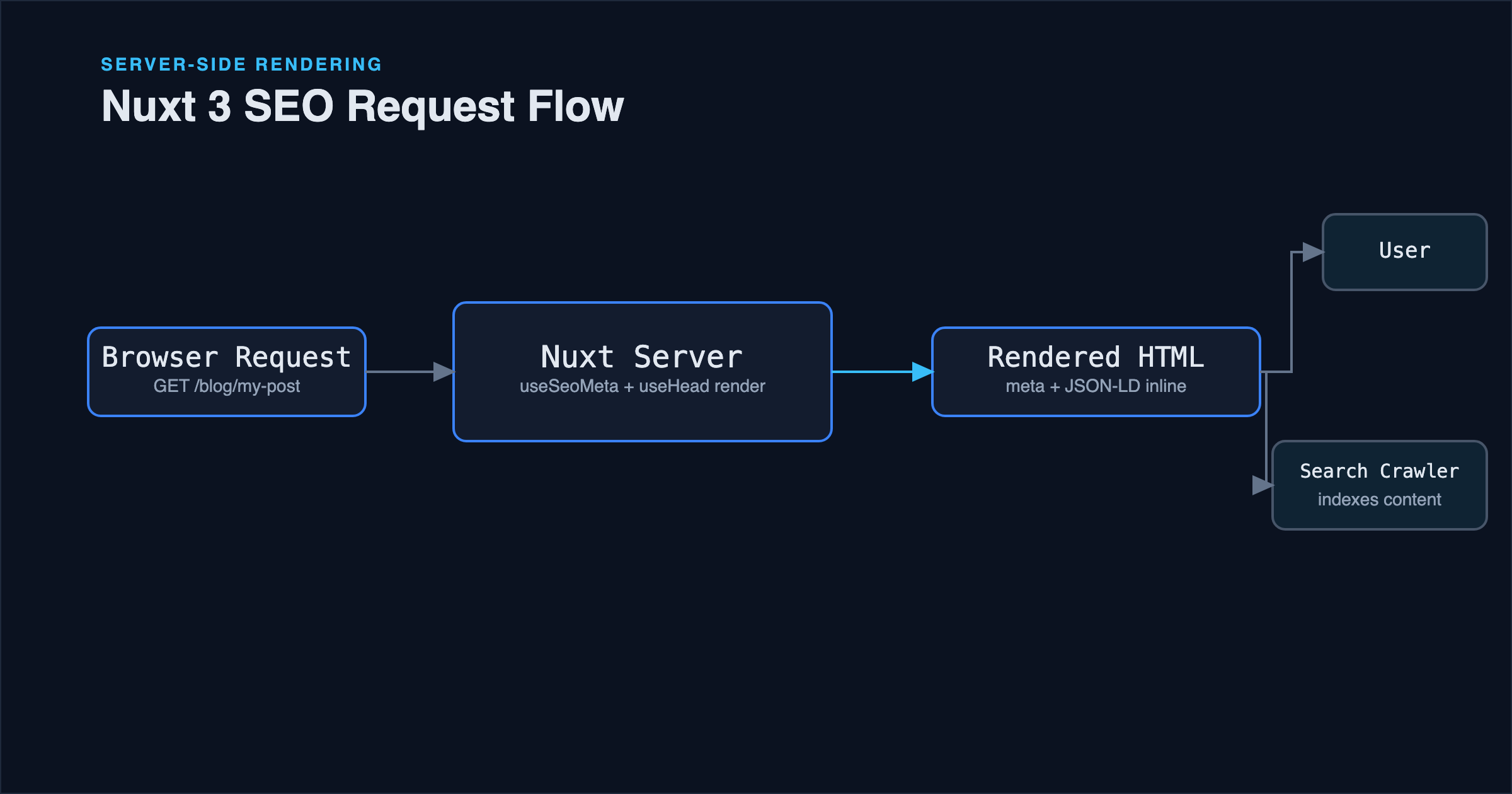
A Nuxt app can look complete (routing works, data loads, the UI is polished) and still be nearly invisible to search engines because every page shares the same generic title tag, or because content that renders fine in a browser never makes it into the HTML a crawler actually receives. Nuxt's SEO tooling (useSeoMeta, useHead, rendering modes) solves both problems, but only if it's used per-page rather than once globally, and only if you understand which rendering mode actually determines what's crawlable.
This article covers implementing per-page SEO metadata correctly, why rendering mode is the decision that matters most for crawlability, and adding structured data that search engines can use for rich results.
Rendering Mode Is the Decision That Matters Most
Before any meta tag matters, there's a more fundamental question: does the HTML sent to a crawler actually contain your content, or does it contain an empty shell that only fills in after JavaScript runs?
A pure client-side-rendered app sends a nearly empty <div id="app"></div> in its initial HTML response: content appears only after JavaScript downloads, executes, and renders it. Modern Google indexing does execute JavaScript, but it happens as a second rendering pass, is more resource-intensive on Google's side, and isn't a guarantee every crawler (or every page, under indexing budget constraints) receives the same treatment. Other crawlers and social media link-preview bots frequently don't execute JavaScript at all, which is why a client-only page often shows a blank or generic preview when shared on social platforms.
Nuxt's default universal rendering (SSR) avoids this entirely: the server renders full HTML for each request, meta tags and all, before sending anything to the browser. This is the mode you want for any page that needs to be reliably indexed and needs correct link previews. For content that's the same for every visitor and doesn't change often, static site generation (nuxt generate) goes a step further, pre-rendering HTML at build time: the same crawlability benefit as SSR, with the added advantage of serving pre-built files instead of rendering on every request.
The practical rule: if a page's content is public and matters for search visibility, it should be server-rendered or statically generated, not left to pure client-side rendering. Nuxt 3 defaults to SSR for the whole app, so this is usually already the case: the mistake to watch for is disabling SSR for specific routes (ssr: false in nuxt.config.ts route rules) without registering that the trade-off includes losing this benefit for that route.
Per-Page Meta Tags With useSeoMeta
The most common SEO mistake in a Nuxt app isn't a missing feature: it's setting title and description once, globally, in nuxt.config.ts, and never overriding them per page. Every page ends up with an identical title tag, which both looks generic in search results and actively hurts each individual page's ability to rank for its own specific topic.useSeoMeta fixes this by being called inside each page component, generating the tags reactively based on that page's own data. It's a regular composable, called the same way as any other Composition API function covered in Vue 3 Composition API: Practical Patterns: the reactivity rules there apply here too, which is why passing a ref or a getter into useSeoMeta keeps the tags in sync as the underlying data changes, instead of freezing them at whatever value existed on first render:
<script setup>
const { data: post } = await useFetch(`/api/blog-posts/${route.params.slug}`);

useSeoMeta({
  title: post.value.metaTitle || post.value.title,
  description: post.value.metaDescription,
  ogTitle: post.value.metaTitle || post.value.title,
  ogDescription: post.value.metaDescription,
  ogImage: post.value.ogImageUrl || post.value.coverImageUrl,
  ogType: 'article',
  twitterCard: 'summary_large_image',
});
</script>
Because this runs per-page, each route gets metadata specific to what it actually shows, and because it's driven by post.value (fetched data), it works correctly for dynamic routes: a blog post detail page gets a different title and description for every slug, generated from the same component code rather than duplicated per page.useSeoMeta covers the common, well-known meta tags with type safety and typo protection built in. For anything it doesn't cover directly (a <link rel="canonical">, JSON-LD structured data, or a custom meta tag), useHead is the lower-level primitive underneath it, usable directly.
Canonical URLs
Canonical tags tell search engines which URL is the authoritative version of a page, which matters whenever the same content is reachable through more than one URL: with and without a trailing slash, with tracking query parameters, or through both an old and a new route during a migration:
<script setup>
const route = useRoute();
const canonicalUrl = `https://muzanella.com${route.path}`;

useHead({
  link: [{ rel: 'canonical', href: canonicalUrl }],
});
</script>
Without a canonical tag, search engines make their own guess about which version of a URL to treat as authoritative, which can split ranking signals across duplicate-looking URLs instead of consolidating them onto one. Setting it explicitly, on every page, removes the guesswork.
Structured Data With JSON-LD
Structured data doesn't change what's visible on the page: it gives search engines an explicit, machine-readable description of the content, which is what enables rich results (star ratings, article bylines, breadcrumbs) in search listings. For a blog post, the Article schema is the relevant one:
<script setup>
useHead({
  script: [
    {
      type: 'application/ld+json',
      innerHTML: JSON.stringify({
        '@context': 'https://schema.org',
        '@type': 'Article',
        headline: post.value.title,
        description: post.value.metaDescription,
        image: post.value.coverImageUrl,
        datePublished: post.value.publishedAt,
        dateModified: post.value.updatedAt,
        author: {
          '@type': 'Person',
          name: 'Nurfirliana Muzanella',
        },
      }),
    },
  ],
});
</script>
This is worth pairing with Google's Rich Results Test during development: structured data with a typo or a missing required field doesn't throw a JavaScript error, it just silently fails to qualify for rich results, which makes it easy to ship broken structured data without noticing.
Sitemaps and Robots
A sitemap gives search engines a direct list of URLs to crawl, instead of relying entirely on discovering pages by following links: particularly useful for pages that aren't linked prominently from your homepage. The @nuxtjs/sitemap module generates one automatically from your app's routes:
npx nuxi module add sitemap
// nuxt.config.ts
export default defineNuxtConfig({
  modules: ['@nuxtjs/sitemap'],
  site: {
    url: 'https://muzanella.com',
  },
});
For dynamic routes (blog posts by slug, for instance), the module needs to be told how to enumerate them, typically by pointing it at an API endpoint or a source function that returns the current list of published slugs, since it can't infer dynamic route values from the route pattern alone.robots.txt is the complementary piece: it doesn't affect ranking directly, but it tells crawlers which paths not to bother with (an admin panel, an API namespace), keeping crawl budget focused on pages that are actually meant to be indexed.
Common Mistakes
Setting useSeoMeta once at the layout or app level instead of per page. This is the single highest-impact mistake: it guarantees every page shares one title and description, which undermines the point of having multiple indexable pages in the first place.
Relying on client-side rendering for content that needs to be indexed. Covered above: if a route disables SSR, that trade-off needs to be a deliberate choice for a page that genuinely doesn't need search visibility (an authenticated dashboard, for instance), not an accidental side effect of a performance optimization.
Forgetting dateModified in structured data after editing a published post. Search engines use it as a freshness signal; a post that's been substantially updated but still reports its original publish date as the modification date undersells how current the content actually is.
Truncated or missing meta descriptions. A metaDescription left empty means search engines generate their own snippet from page content, which is inconsistent and often not the summary you'd choose. Keeping descriptions in the roughly 150-160 character range that most search results actually display avoids both an empty fallback and an awkward mid-sentence truncation.
Best Practices Checklist
- Call
useSeoMetainside every page component, not once globally. - Keep SSR (or static generation) enabled for any route that needs to be indexed.
- Set an explicit canonical URL on every page.
- Add
Article(or the appropriate type) JSON-LD structured data to content pages, and validate it with Google's Rich Results Test. - Generate a sitemap that includes dynamic routes, not just static ones.
- Write a genuine, unique meta description per page rather than leaving it to fall back to page content.
FAQ
Does Nuxt 3 handle SEO automatically without any of this? No: Nuxt provides the tools (useSeoMeta, useHead, SSR by default) but none of it is automatic per-page content. Without explicitly calling useSeoMeta on each page, you get whatever default title and description are set globally, repeated everywhere.
Is SSR required for good SEO in Nuxt, or is client-side rendering acceptable? For any page you want reliably indexed and correctly previewed when shared, SSR (or static generation) removes the uncertainty around whether a crawler executes JavaScript. Client-side rendering is a reasonable choice for routes that don't need search visibility at all, like an authenticated app dashboard.
How long should a meta description actually be? Search engines don't enforce a hard limit, but results are typically truncated somewhere around 150-160 characters on desktop, fewer on mobile. Writing to that length as a target, rather than writing as long as allowed, avoids an ugly mid-word cutoff in results.
Conclusion
Nuxt 3's SEO story is strong by default in the sense that SSR is already the standard rendering mode, but the parts that actually differentiate one page's search visibility from another (per-page meta tags, canonical URLs, structured data) require deliberate, per-page implementation. None of it is exotic; it's mostly a matter of calling useSeoMeta and useHead consistently on every page that matters, instead of relying on one global configuration to cover pages that are, by definition, all different.
References
- Nuxt documentation: SEO and Meta
- Nuxt documentation: useSeoMeta
- Nuxt documentation: Rendering Modes
- Google Search Central: Understanding JavaScript SEO basics
- Schema.org: Article